Sun Mar 16 2025
The Xcode SourceKit rabbit hole
TL;DR: A working POC of an Xcode project compile_comands.json generator, which can light up SourceKit LSP in VS Code. It uses the recently open-sourced swift-build, which is a much more robust approach than the current methods based on Xcode build output parsing.
SourceKit LSP is a Language Server Protocol that adds Swift and C-based language editor intelligence to non-Xcode editors. Think features like jump to definition, code completion, and similar. In VS Code, the official Swift extension has this LSP built-in.
So, given that VS Code has Swift support, the natural question is - can I open an Xcode project and get all of this goodness for free? These days, more people than ever are asking this because VS Code and its forks are the home for a lot of new LLM tooling.
Problem
This is what most of your files will look like when you just open your Xcode project root folder in VS Code:
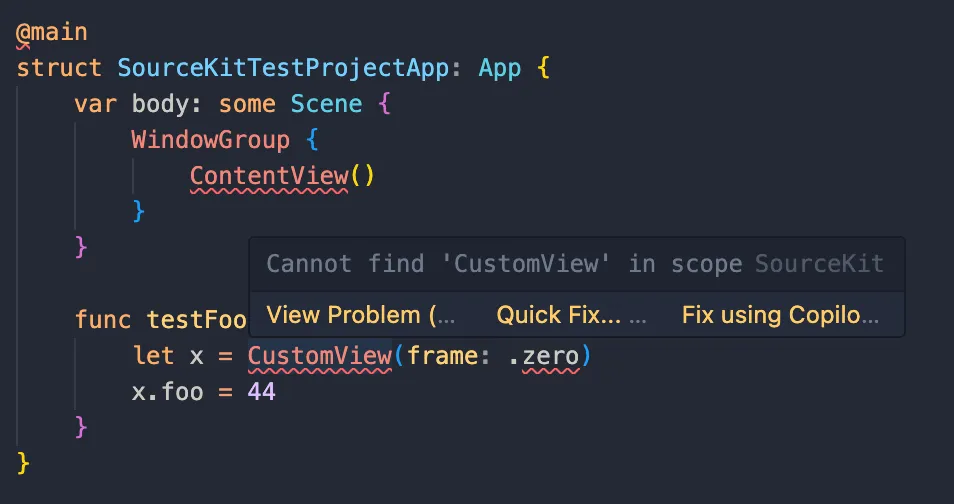
Lots of red everywhere - and it makes sense if you think about it. The correctness of this code depends on a lot of variables - what destination are we intending to build for? What SDK should be available to the compiler? What modules and headers are we importing? SourceKit clearly needs more than just seeing the individual file.
To be more specific, it needs to know how each file gets compiled. That way it can talk to the corresponding compiler with the right flags to generate an AST and whatever else it needs to understand the code.
How to make it work
SPM packages get this for free, because SourceKit LSP has built-in support. This is not the case for Xcode projects - SourceKit just sees them as a folder of source files - and we’ll need to provide these compile commands to the LSP manually. There’s a standard way of doing this - a compile_commands.json file1, AKA a compilation database.
Generating the compilation database
Here’s where the true rabbit hole begins.
We don’t build Xcode projects. Xcode does. We just invoke the build (from GUI or using xcodebuild), and Xcode orchestrates the project spec parsing, calculating dependencies, resolving configs (often from a complex hierarchy of xcconfigs and GUI settings), and ultimately invoking the swift and clang compilers to do the actual thing.
So just parse the Xcode build output?
Xcode graciously tells us the exact compiler invocations. So surely we can just parse the build output to look for those, and convert that to a compile_commands.json?
All the open source solutions I could find do exactly this. Just search for xcodeproj generate json compile commands and you’ll find plenty.
They all have fundamental problems:
- You don’t get the right info from incremental builds - each file you’re interested in actually has to build for you to see the compiler invocation in the build output.
- You have to build in the first place - notice how we just need the compiler args, but we need to perform a full build to even get them. This shouldn’t be necessary!
- You’re relying on Xcode implementation details - xcode build output is not standardized, so your parser can break after any update, or hit random edge cases you didn’t account for.
- (Very related to previous point) We need the compiler args for
swiftc, but Xcode doesn’t even callswiftc! It directly invokes swift frontend. Which takes in different flags thanswiftc. And all of those are also an implementation detail. In fact, even the existence ofswift-frontendis an implementation detail. So even if you somehow fight through all of these, you’ll end up with a solution that’s slow and fragile.
There is another way (yes there is a caveat)
Xcode actually uses SourceKit internally. Even if it doesn’t rely on the specific JSON compilation db format, it needs to do exactly what we need - get the compiler args without running a build.
Turns out this is exposed at the xcodebuild level, through the showBuildSettingsForIndex argument. Nice!
Here’s what it outputs:
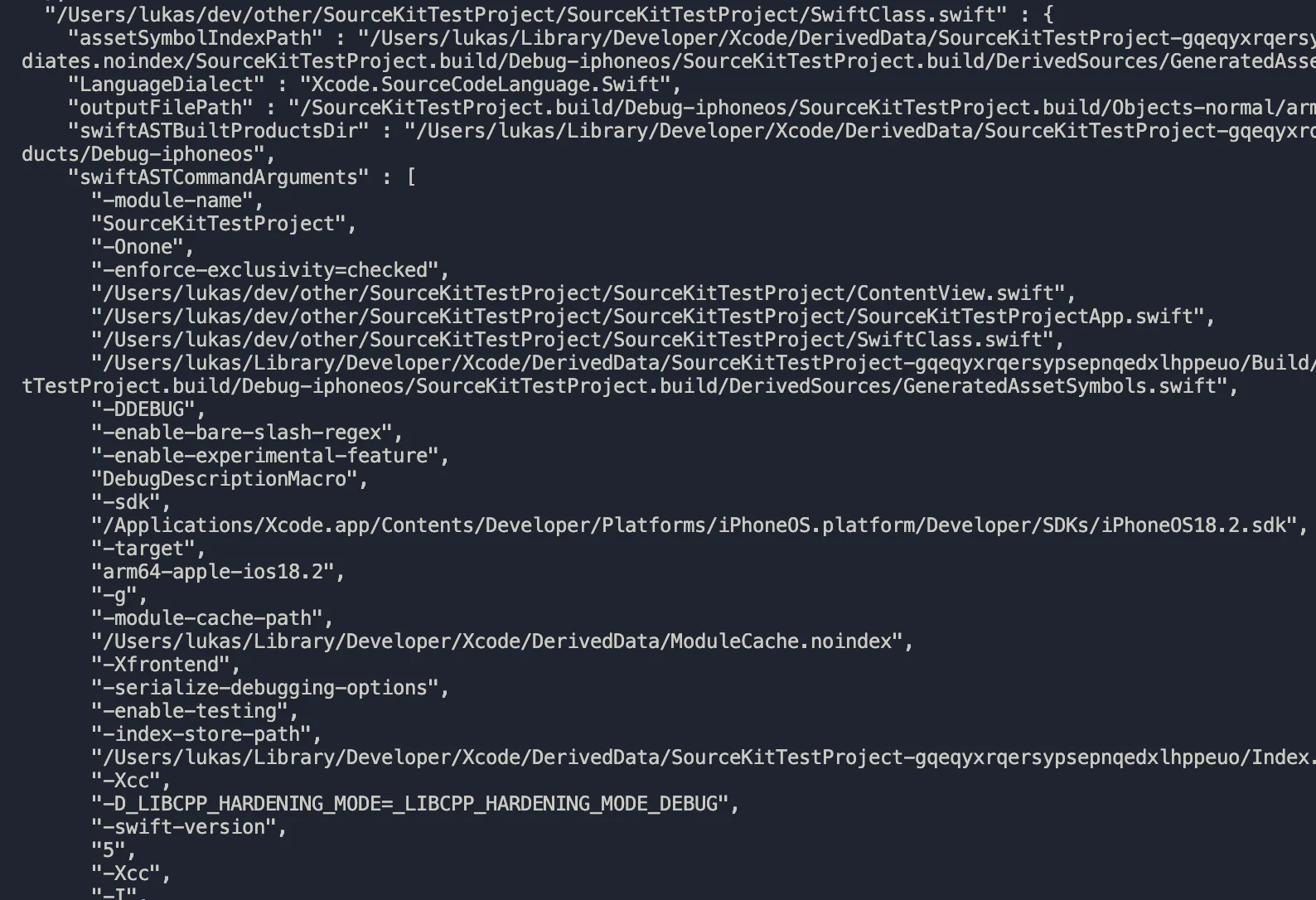
These are exactly the args that we need! Just convert them to a json and we’re done. This actually works and I haven’t seen anyone else do this as of writing this post. But there is a large caveat.
What about that destination thing?
Ah, yes. Different files may target a different platform. And sometimes, the same target may support multiple platforms. Correct source code understanding depends on what the active platform / config / scheme / destination, whatever else is.
So let’s add those configs to the xcodebuild invocation. Something like:
xcodebuild -project X -schema Y
or
xcodebuild -project X -configuration Y -destination Z
I’ll spare you the pain, showBuildSettingsForIndex is broken. It ignores schemas, architectures, configs, destinations, pretty much everything but the project path. It’s a very half baked attempt at exposing the very useful internal mode of Xcode’s build system. This results in incorrect compile commands, unless you have a very simple single platform project.
If this was a few months ago, this is where the rabbit hole would end.
Xcode build system is open source now!
In Feb 2025, Apple open sourced swift-build. This is a bigger deal than the name would imply. This isn’t just the swift build system. It covers a huge chunk of what Xcode does during a build2. Xcode project parsing, xcconfigs, dependency resolution, invoking both clang and swiftc and… index build settings generation :)
Look at this magnificent undocumented function.
This is a rough equivalent of xcodebuild -showBuildSettingsForIndex except you know, it actually doesn’t ignore additional build configuration.
After exploring the swift-build tests for usage examples, I was able to come up with a very rough POC that generates working compile commands with support for both clang and swiftc, using swift-build.
I didn’t have time to take this further, so that’s the end of this rabbit hole for now! I believe this approach can be more robust than any of the currently available solutions.
Footnotes
-
Only clang compile commands have a well defined json spec. For swift commands, you kinda just have to extrapolate, or better yet look at how SourceKit actually parses the json. ↩
-
My understanding is that Xcode has been using swift-build internally for years. It’s what they called the “new build system” in Xcode 10. ↩